Lab 11: Interactions With Categorical Predictors

PSYC 7804 - Regression with Lab

Fabio Setti

Spring 2025

Today’s Packages and Data 🤗

Install Packages Code
# install.packages("tidyverse")
install.packages("emmeans")
library(tidyverse)
theme_set(theme_classic(base_size = 16, 
                        base_family = 'serif'))
library(emmeans)


The emmeans package (Lenth et al., 2025) is a great package for exploring the results of many linear, generalized linear, and mixed models. it also helps compute mean contrasts, trends, and comparisons of slopes. I discover some new functionality every time I look at this package!
Data
We’ll continue with the hsb2 dataset from Lab 10.
hsb2 <- rio::import("https://github.com/quinix45/PSYC-7804-Regression-Lab-Slides/raw/refs/heads/main/Slides%20Files/Data/hsb2.csv")

What are we looking at Today?

In Lab 10 we looked at categorical predictors and a bunch of coding schemes for categorical variables, but we will stick to dummy coding for this lab.

We eventually want to look at whether gender (\(Z\)) moderates how socst (\(X\)) score predicts write (\(Y\)) score. As a reminder:

  • gender: student gender (either male or female).
  • socst: score on a standardized social studies assessment.
  • write: score on a standardized writing assessment.
let’s center socst for ease of interpretation later:
hsb2$socst_cent <- scale(hsb2$socst, scale = FALSE)[,1]

gender is a categorical variable, so let’s turn it into a factor

hsb2$gender <- factor(hsb2$gender)

contrasts(hsb2$gender)
       male
female    0
male      1

So for the dummy coded gender variable, \(0 =\) female and \(1 =\) male

Starting from The Top

First let’s start with a regression with the gender only predicting write score. We saw this in Lab 10 already.

reg_gender <- lm(write ~ gender, data = hsb2)

summary(reg_gender)

Call:
lm(formula = write ~ gender, data = hsb2)

Residuals:
    Min      1Q  Median      3Q     Max 
-19.991  -6.371   1.879   7.009  16.879 

Coefficients:
            Estimate Std. Error t value Pr(>|t|)    
(Intercept)  54.9908     0.8797  62.509  < 2e-16 ***
gendermale   -4.8699     1.3042  -3.734 0.000246 ***
---
Signif. codes:  0 '***' 0.001 '**' 0.01 '*' 0.05 '.' 0.1 ' ' 1

Residual standard error: 9.185 on 198 degrees of freedom
Multiple R-squared:  0.06579,   Adjusted R-squared:  0.06107 
F-statistic: 13.94 on 1 and 198 DF,  p-value: 0.0002463

\[\widehat{\mathrm{write}} = 54.99 - 4.86 \times \mathrm{gender} \]

We looked at the interpretation for this kind of regression in the last lab:

  • \(54.99\) is the expected mean write score of females (which is coded as \(0\)).
  • \(-4.86\) is the expected mean difference in write score for males compared to females.

Thus, there is a significant difference in write score between the two groups, with males being \(-4.86\) lower on average.

Visualizing write ~ gender

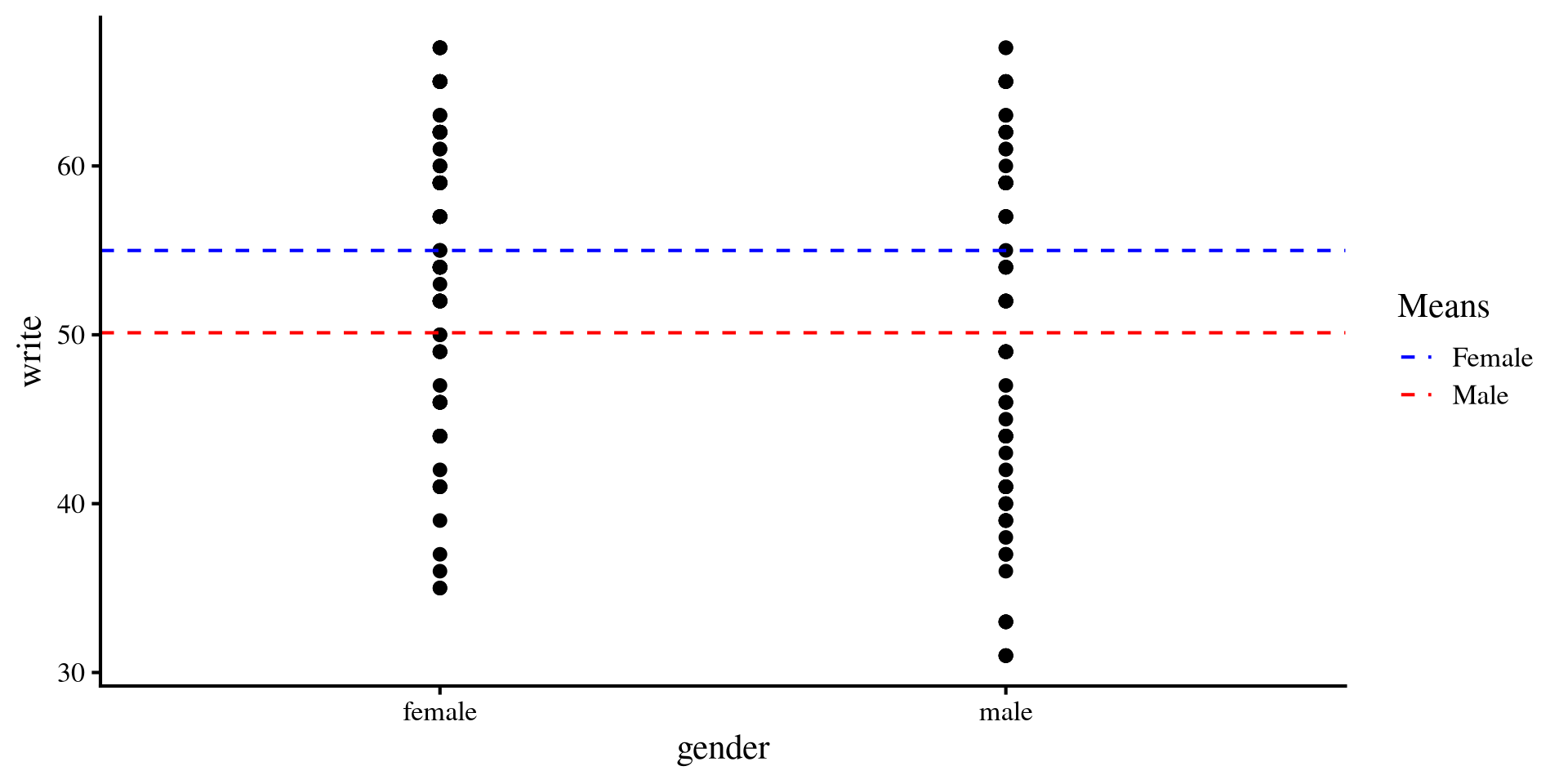
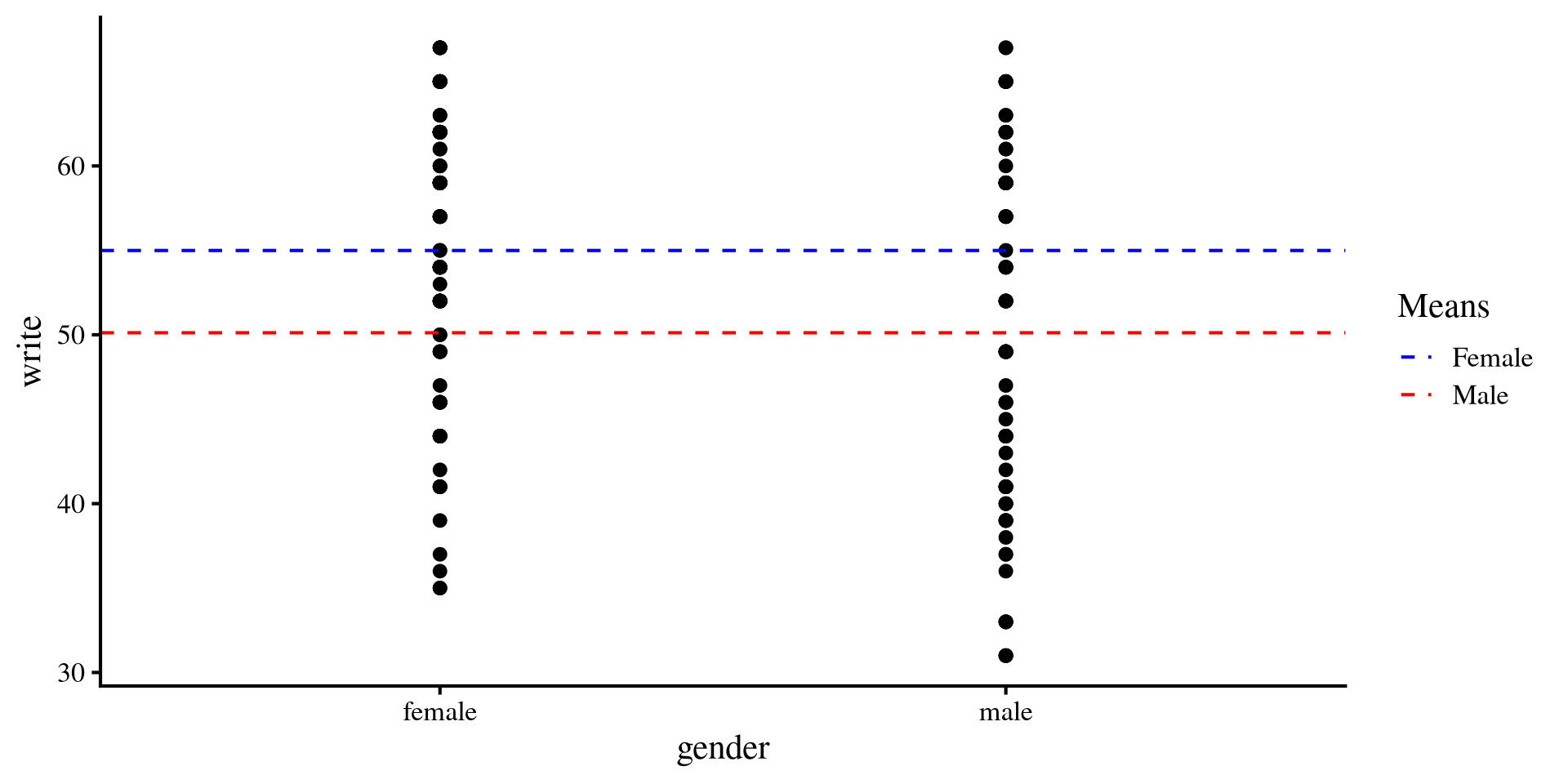
Once again, we can visualize the mean differences between the two groups.

This is nothing new, but it is interesting to see what happens to this plot once we add a continuous predictor to our regression.

Plot code
mean_female <- mean(hsb2$write[hsb2$gender == "female"])
mean_male <- mean(hsb2$write[hsb2$gender == "male"])

ggplot(hsb2, aes(x = gender, y = write)) +
  geom_point() +
  geom_hline(aes(yintercept = mean(mean_female), color = "Female"), 
             linetype = "dashed") +
  geom_hline(aes(yintercept = mean(mean_male), color = "Male"), 
             linetype = "dashed") +
  scale_color_manual(values = c("Female" = "blue", "Male" = "red")) +
  labs(color = "Means")
Adding a continous Predictor

We further hypothesize that socst should be positively related to write score.

reg_both <- lm(write ~ gender + socst_cent, data = hsb2)

summary(reg_both)

Call:
lm(formula = write ~ gender + socst_cent, data = hsb2)

Residuals:
     Min       1Q   Median       3Q      Max 
-18.7066  -4.6302  -0.2224   5.2485  18.4840 

Coefficients:
            Estimate Std. Error t value Pr(>|t|)    
(Intercept) 54.72254    0.69748  78.458  < 2e-16 ***
gendermale  -4.28032    1.03479  -4.136 5.22e-05 ***
socst_cent   0.52355    0.04812  10.880  < 2e-16 ***
---
Signif. codes:  0 '***' 0.001 '**' 0.01 '*' 0.05 '.' 0.1 ' ' 1

Residual standard error: 7.277 on 197 degrees of freedom
Multiple R-squared:  0.4165,    Adjusted R-squared:  0.4105 
F-statistic:  70.3 on 2 and 197 DF,  p-value: < 2.2e-16

\[\widehat{\mathrm{write}} = 54.72 - 4.28 \times \mathrm{gender} + .52 \times \mathrm{socst}\]

Now that we have a continuous predictor, things are slightly different:

  • \(54.72\) is now the expected mean write score of females, when socst is at its mean value.
  • \(-4.28\) is the expected mean difference in write score for males compared to females. when socst is controlled.
  • \(.52\) is the expected mean increase in write for each unit increase in socst. Unsurprisingly, write and socst are positively related.

Visualizing write ~ gender + socst

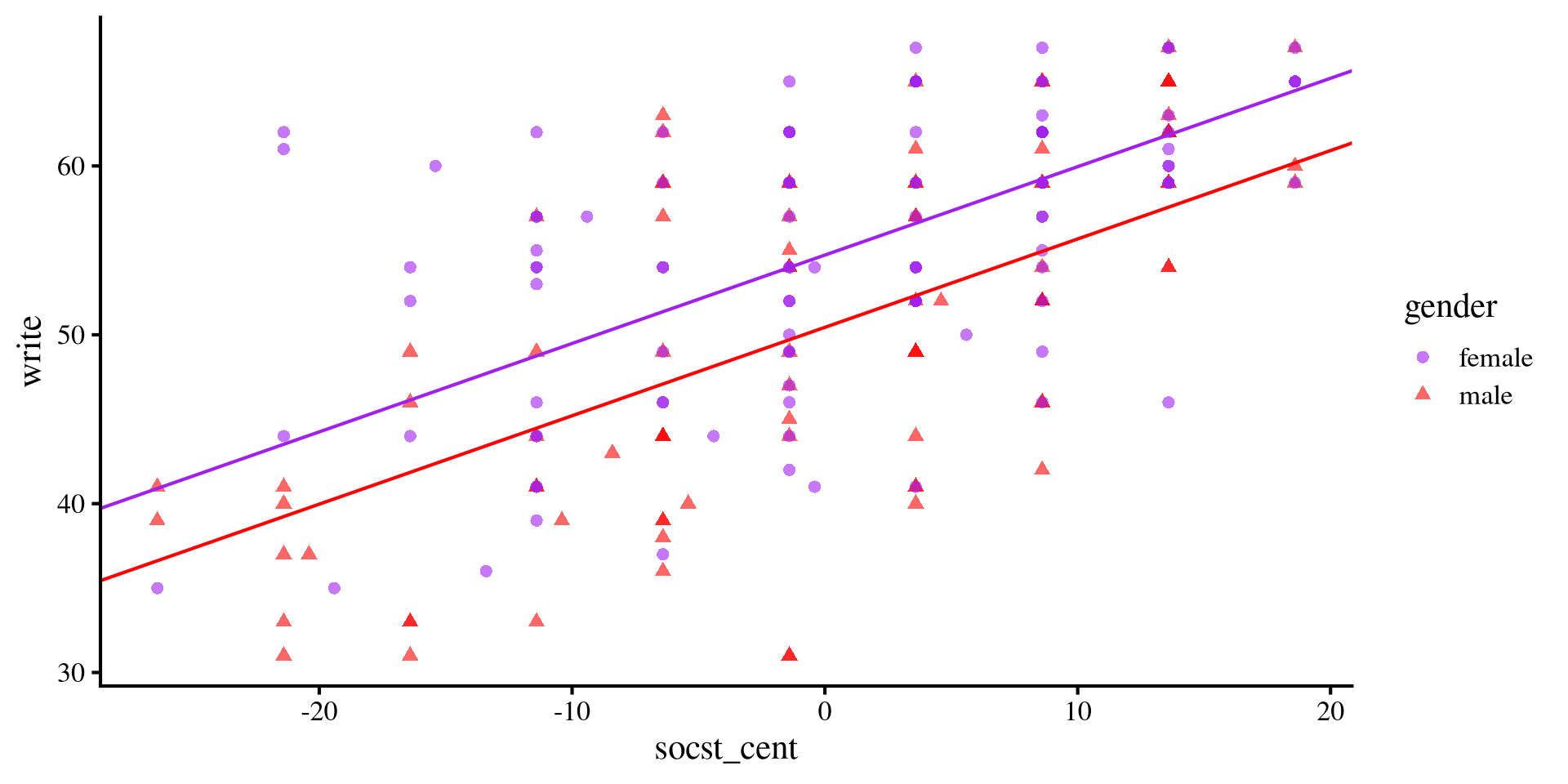
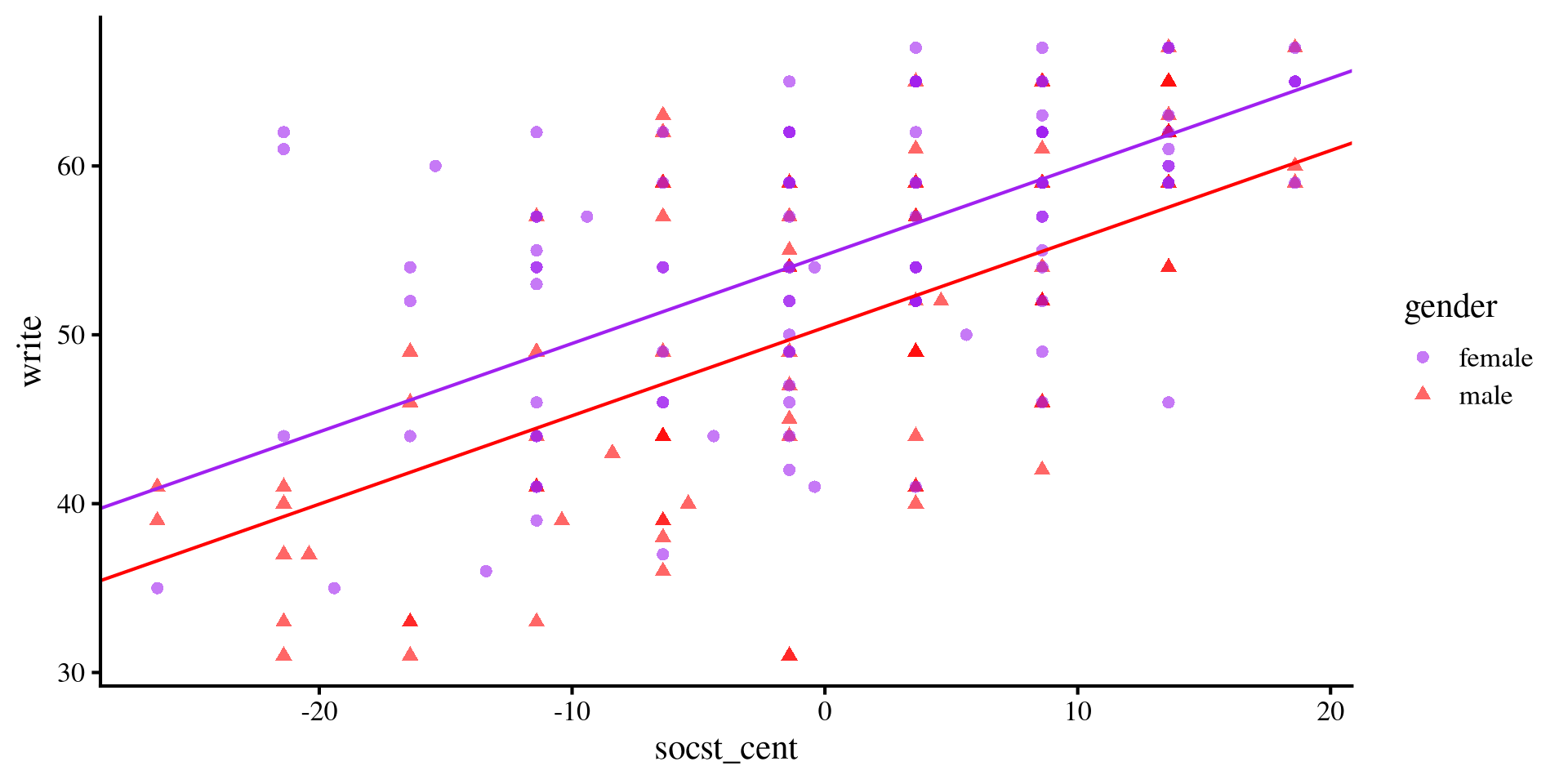
What this model represents is effectively two separate regression lines for the two groups, which differ only based on the intercept.


If you have heard of the term ANCOVA before, this is what we just ran.


Note that the slopes are the same, meaning that we are assuming that the relation between socst and write should be the same for both groups.
Plot code
ggplot(hsb2, aes(x = socst_cent, y = write, colour = gender)) +
  geom_point(aes(shape = gender), alpha= .6) +
  geom_abline(intercept = coef(reg_both)[1], slope = coef(reg_both)[3], col = "purple") + 
  geom_abline(intercept = coef(reg_both)[1] + coef(reg_both)[2], slope = coef(reg_both)[3], col = "red") + 
  scale_color_manual(values=c( "purple", "red")) 
Adding the Interaction

If we think that the relationship between socst and write should change depending on gender, we can test this hypothesis by including an interaction effect.

reg_int <- lm(write ~ gender*socst_cent, data = hsb2)

summary(reg_int)

Call:
lm(formula = write ~ gender * socst_cent, data = hsb2)

Residuals:
     Min       1Q   Median       3Q      Max 
-18.6265  -4.3108  -0.0645   5.0429  16.4974 

Coefficients:
                      Estimate Std. Error t value Pr(>|t|)    
(Intercept)           54.77557    0.69162  79.199  < 2e-16 ***
gendermale            -4.27120    1.02545  -4.165 4.66e-05 ***
socst_cent             0.42007    0.06780   6.195 3.36e-09 ***
gendermale:socst_cent  0.20473    0.09537   2.147   0.0331 *  
---
Signif. codes:  0 '***' 0.001 '**' 0.01 '*' 0.05 '.' 0.1 ' ' 1

Residual standard error: 7.212 on 196 degrees of freedom
Multiple R-squared:  0.4299,    Adjusted R-squared:  0.4211 
F-statistic: 49.26 on 3 and 196 DF,  p-value: < 2.2e-16

we add the \(.2 \times \mathrm{gender} \times \mathrm{socst}\) term to the equation from two slides ago.

  • \(54.78\) is still the expected mean write score of females, when socst is at its mean value.
  • \(-4.28\) is the expected mean difference in write score for males compared to females, when socst is controlled.
  • \(.42\) is the expected mean increase in write for each unit increase in socst for females.
  • \(.2\) is the expected difference in slope between write and socst for the males.

Interpreting the Interaction Term

When we have a categorical moderator, interpreting the interaction terms boils down at looking how the slopes of the groups change.

Equation for Males

\[\widehat{\mathrm{write}} = 54.78 - 4.28 \times \mathrm{gender} + .42 \times \mathrm{socst} + .2 \times \mathrm{gender} \times \mathrm{socst}\]

\[\widehat{\mathrm{write}} = 54.78 - 4.28 \times \mathrm{gender} + .42 \times \mathrm{socst} + .2 \times 1 \times \mathrm{socst}\]

\[\widehat{\mathrm{write}} = 54.78 - 4.28 \times \mathrm{gender} + .42 \times \mathrm{socst} + .2 \times \mathrm{socst}\]

\[\widehat{\mathrm{write}} = 54.78 - 4.28 \times \mathrm{gender} + .62 \times \mathrm{socst}\]

Equation for Females

\[\widehat{\mathrm{write}} = 54.78 - 4.28 \times \mathrm{gender} + .42 \times \mathrm{socst} + .2 \times \mathrm{gender} \times \mathrm{socst}\]

\[\widehat{\mathrm{write}} = 54.78 - 4.28 \times \mathrm{gender} + .42 \times \mathrm{socst} + .2 \times 0 \times \mathrm{socst}\]

\[\widehat{\mathrm{write}} = 54.78 - 4.28 \times \mathrm{gender} + .42 \times \mathrm{socst}\]

So, we expect the relation between write and socst (i.e., the slope of socst) to be \(.2\) larger for males.

Visualizing write ~ gender * socst


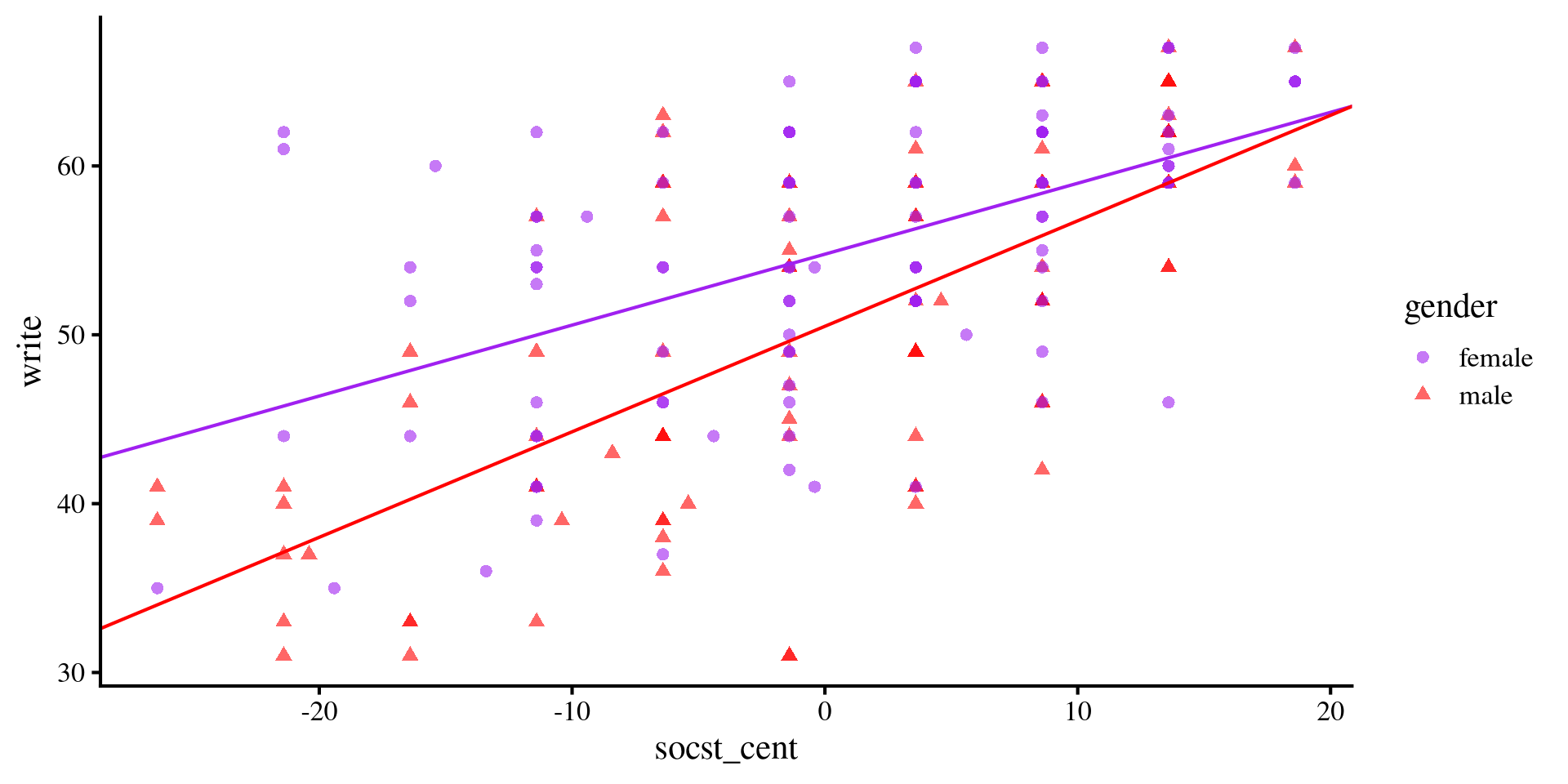
The slope for males is steeper. Although at lower levels of socst, females do considerably better, the gap closes more and more as socst increases.
A significant interaction term implies that the difference between the slopes between the two groups is non-zero.
Plot code
ggplot(hsb2, aes(x = socst_cent, y = write, colour = gender)) +
  geom_point(aes(shape = gender), alpha= .6) +
  geom_abline(intercept = coef(reg_int)[1], slope = coef(reg_int)[3], col = "purple") + 
  geom_abline(intercept = coef(reg_int)[1] + coef(reg_int)[2], slope = coef(reg_int)[3] + coef(reg_int)[4], col = "red") + 
  scale_color_manual(values=c( "purple", "red")) 
Plot code
ggplot(hsb2, aes(x = socst_cent, y = write, colour = gender)) +
  geom_point(aes(shape = gender), alpha= .6) +
  geom_abline(intercept = coef(reg_both)[1], slope = coef(reg_both)[3], col = "purple") + 
  geom_abline(intercept = coef(reg_both)[1] + coef(reg_both)[2], slope = coef(reg_both)[3], col = "red") + 
  scale_color_manual(values=c( "purple", "red")) 
Plot code
mean_female <- mean(hsb2$write[hsb2$gender == "female"])
mean_male <- mean(hsb2$write[hsb2$gender == "male"])

ggplot(hsb2, aes(x = gender, y = write)) +
  geom_point() +
  geom_hline(aes(yintercept = mean(mean_female), color = "Female"), 
             linetype = "dashed") +
  geom_hline(aes(yintercept = mean(mean_male), color = "Male"), 
             linetype = "dashed") +
  scale_color_manual(values = c("Female" = "blue", "Male" = "red")) +
  labs(color = "Means")
Simple Slopes With emmeans

Whenever categorical variables are involved, the emmeans package likely has some functions to summarize results. For interaction between continuous and categorical variables, the emtrends() function is very helpful!


Although we calculated the simple slopes by hand two slides ago, you don’t really want to do that (especially when your categorical predictors have more levels!)
The emtrends() function also provides confidence intervals for the slopes.
emtrends(reg_int, ~gender, var = "socst_cent")
 gender socst_cent.trend     SE  df lower.CL upper.CL
 female            0.420 0.0678 196    0.286    0.554
 male              0.625 0.0671 196    0.493    0.757

Confidence level used: 0.95 
  • reg_int is the regression model.
  • ~ followed by gender implies that we want the slopes for each level of the gender variable.
  • var = followed by "socst_cent" is the continuous predictor we want to get slopes for.
Here we have a simple example, but you can request slopes for multiple predictors and categorical moderators at once. This page has a really comprehensive tutorial on how to use the emmeans package with interactions.

Predicted Means

So far we have been focusing on the slope of socst_cent, but we can also shift our focus to means and mean differences. In our case, the emmeans package can be used to calculate predicted means of groups at different values of the continuous variable.
We need to define the values of socst_cent at which we want to calculate means. We do this by creating a list object containing the name of the continuous variable and the values at which we want to calculate means.
sd_below <- -sd(hsb2$socst_cent)
sd_above <- sd(hsb2$socst_cent)

# the mean is 0 because the variable is centered
mylist <- list(socst_cent=c(sd_below,
                            0,
                            sd_above))
Then we pass the regression object (reg_int), and use ~socst_cent*gender to tell the function that we want the means of each level of gender by the specified values of socst_cent:
means <- emmeans(reg_int, ~socst_cent*gender, 
                at = mylist)
 socst_cent gender emmean    SE  df lower.CL upper.CL
      -10.7 female   50.3 1.030 196     48.2     52.3
        0.0 female   54.8 0.692 196     53.4     56.1
       10.7 female   59.3 0.979 196     57.4     61.2
      -10.7 male     43.8 1.020 196     41.8     45.8
        0.0 male     50.5 0.757 196     49.0     52.0
       10.7 male     57.2 1.070 196     55.1     59.3

Confidence level used: 0.95 
In the emmean (stands for estimated marginal mean) column we have the mean expected value of write score for males and females at -/+ 1 SD and mean of socst score.

Predicted Means Graphically

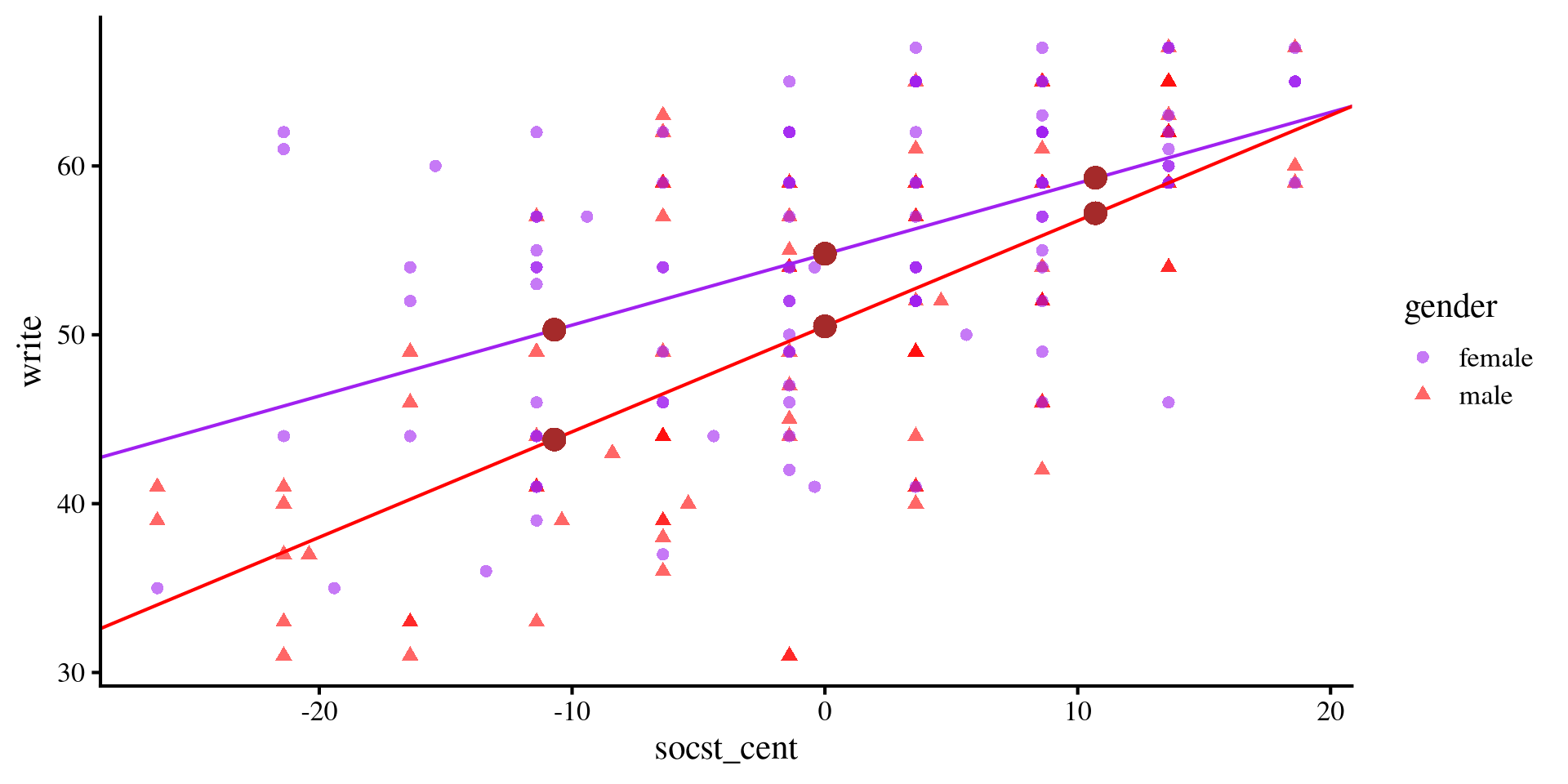
The previous slide may seem intimidating, but the means of write score that we just calculated (brown dots in the plot) are simply the values of \(y\)-axis given some values of \(x\) according to the regression line of each groups.

 socst_cent gender emmean    SE  df lower.CL upper.CL
      -10.7 female   50.3 1.030 196     48.2     52.3
        0.0 female   54.8 0.692 196     53.4     56.1
       10.7 female   59.3 0.979 196     57.4     61.2
      -10.7 male     43.8 1.020 196     41.8     45.8
        0.0 male     50.5 0.757 196     49.0     52.0
       10.7 male     57.2 1.070 196     55.1     59.3

Confidence level used: 0.95 
Plot code
ggplot(hsb2, aes(x = socst_cent, y = write, colour = gender)) +
  geom_point(aes(shape = gender), alpha= .6) +
  geom_abline(intercept = coef(reg_int)[1], slope = coef(reg_int)[3], col = "purple") + 
  geom_abline(intercept = coef(reg_int)[1] + coef(reg_int)[2], slope = coef(reg_int)[3] + coef(reg_int)[4], col = "red") + 
  scale_color_manual(values=c( "purple", "red")) +
  geom_point(aes(x = -10.7, y = 50.3), color = "brown", size = 4) +
  geom_point(aes(x = -10.7, y =  43.8), color = "brown", size = 4) +
  geom_point(aes(x = 0, y = 54.8), color = "brown", size = 4) +
  geom_point(aes(x = 0, y =  50.5), color = "brown", size = 4) +
  geom_point(aes(x = 10.7, y = 59.3), color = "brown", size = 4) +
  geom_point(aes(x = 10.7, y = 57.2), color = "brown", size = 4) 
Testing Mean Differences

Now that we have the means of write score for both groups at different levels of socst score, the logical extention is to test whether these means are significantly different from each other.

We use the contrast() function from the emmeans package (careful! not the contrasts() function 🙈):

contrast(means, "pairwise", by= "socst_cent")
socst_cent = -10.7:
 contrast      estimate   SE  df t.ratio p.value
 female - male     6.47 1.45 196   4.473  <.0001

socst_cent =   0.0:
 contrast      estimate   SE  df t.ratio p.value
 female - male     4.27 1.03 196   4.165  <.0001

socst_cent =  10.7:
 contrast      estimate   SE  df t.ratio p.value
 female - male     2.07 1.45 196   1.428  0.1550
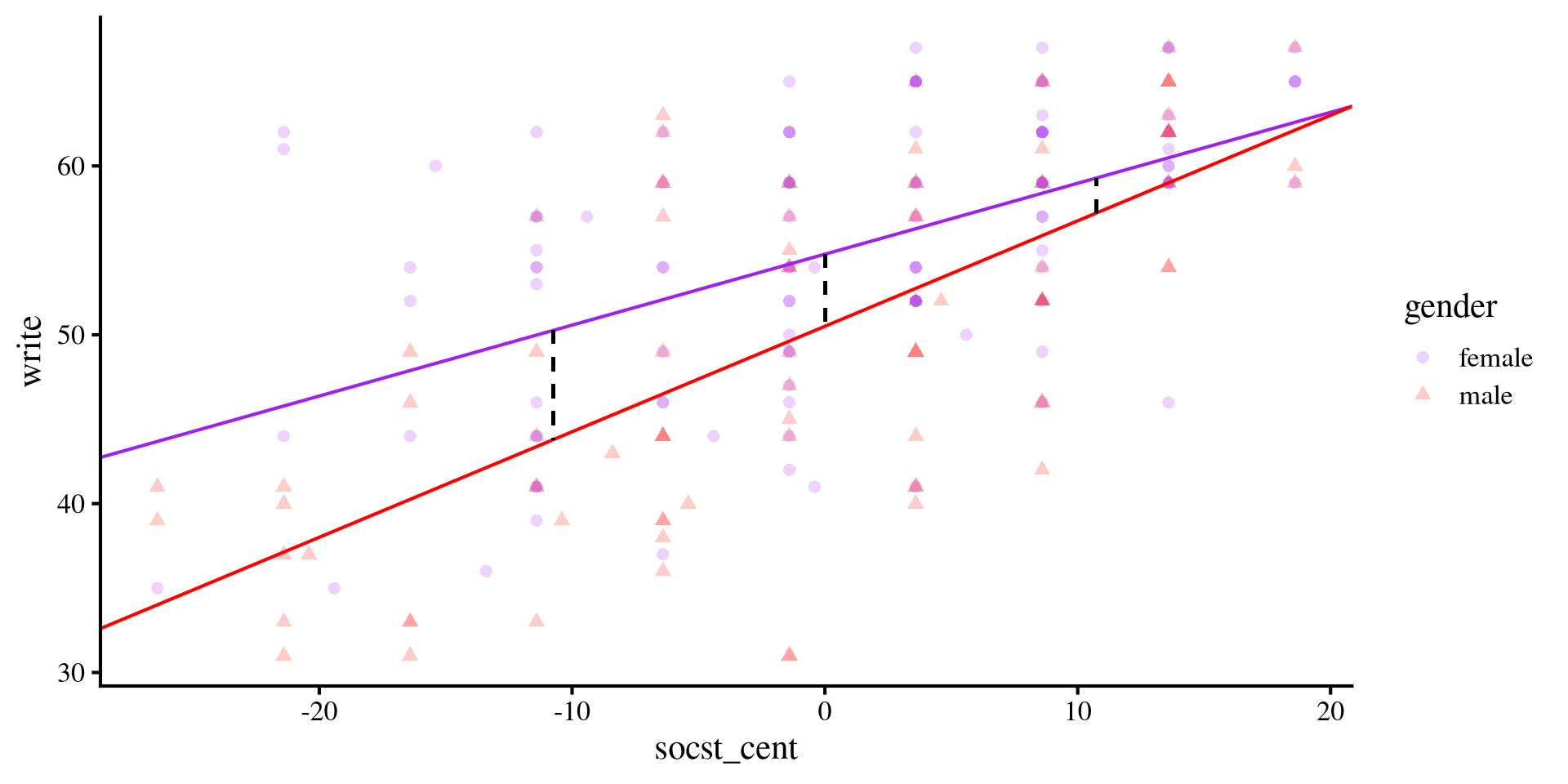
As we observed previously, the mean difference in write is significant at lower values of socst, but is no longer significant at high values of socst.
Because we are running multiple comparisons, there is something to be said for adjusting the \(p\)-values for Type I error rates, although that takes a bit more work and I don’t really want to spend time on that (and you know how I feel about type I errors 🤷).

Mean differences Graphically

Testing mean differences at different values of socst simply mean testing whether the dashed black lines are significantly different from 0 in length. The dashed lines, representing the distance between the two regression lines becomes smaller and smaller as socst increases.

It’s a matter of perspective

You may have noticed that first we looked at (1) whether the slope of socst changed depending on gender, and then we (2) looked at whether there were mean differences in mean write score for gender depending on different values of socst. In other words, we swapped the variable that we were treating as the moderator. This highlights how from a statistical perspective there is no difference between a moderator and a focal predictor. You decide how two present the results and frame the two variables.

Plot code
# save summary for mean differences
sum <- summary(means)

ggplot(hsb2, aes(x = socst_cent, y = write, colour = gender)) +
  geom_point(aes(shape = gender), alpha= .2) +
  geom_abline(intercept = coef(reg_int)[1], slope = coef(reg_int)[3], col = "purple") + 
  geom_abline(intercept = coef(reg_int)[1] + coef(reg_int)[2], slope = coef(reg_int)[3] + coef(reg_int)[4], col = "red") + 
  scale_color_manual(values=c( "purple", "red")) +
  geom_segment(y = sum[1,3], yend = sum[4,3], x = sum[4,1], xend = sum[4,1], col = "black", lty = 2) +
  geom_segment(y = sum[2,3], yend = sum[5,3], x = sum[5,1], xend = sum[5,1], col = "black", lty = 2) +
  geom_segment(y = sum[6,3], yend = sum[3,3], x = sum[3,1], xend = sum[3,1], col = "black", lty = 2) 
johnson-neyman Plot?

Instead of testing differences in the slopes for the 2 groups at different values of the continuous variable, we can do that for all possible values of the continuous variable by using a Johnson-Neyman plot
# the predictor must be a vector of 0s and 1s
hsb2$gender_bin <- ifelse( hsb2$gender == "female", 0, 1)

# rerun the regression with binary gender
reg_int_2 <- lm(write ~ gender_bin * socst_cent, data = hsb2)

# save summary for mean differences
interactions::johnson_neyman(reg_int_2, 
              pred = "gender_bin",
              modx = "socst_cent")
Because we have a categorical variable, the interpretation is conceptually different than what we saw in Lab 9
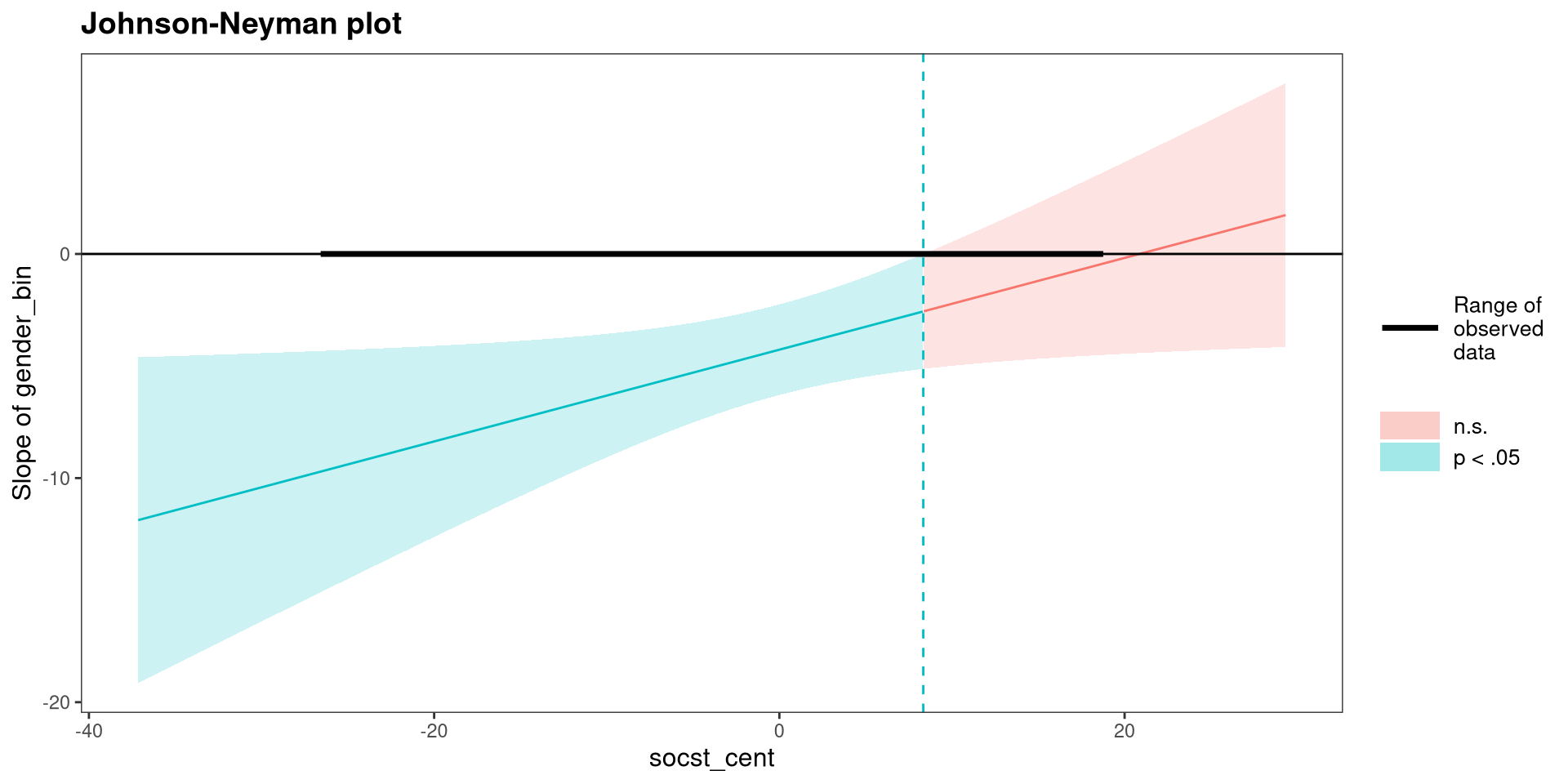
The \(y\)-axis is the difference between the two group means (i.e., the distance between the two lines on the previous slide) in write score for each value of socst score. Consistent with the plot on the previous slide, the difference is no longer significant when socst is around 10 or more.

Plotting with emmip()

We can use the emmip() to plot the slopes for both groups.

First, we need to create a list that tells emmip() the range of the continuous variable for which want to plot slopes. here I choose the minimum and maximum of socst_cent.
min <- min(hsb2$socst_cent)
max <- max(hsb2$socst_cent)

mylist <- list(socst_cent = c(min, 
                              max))
Then we pass pass the regression object, the categorical variable by which we want the slopes, and the list containing the range of the x-axis.
emmip(reg_int, gender~socst_cent, at = mylist)
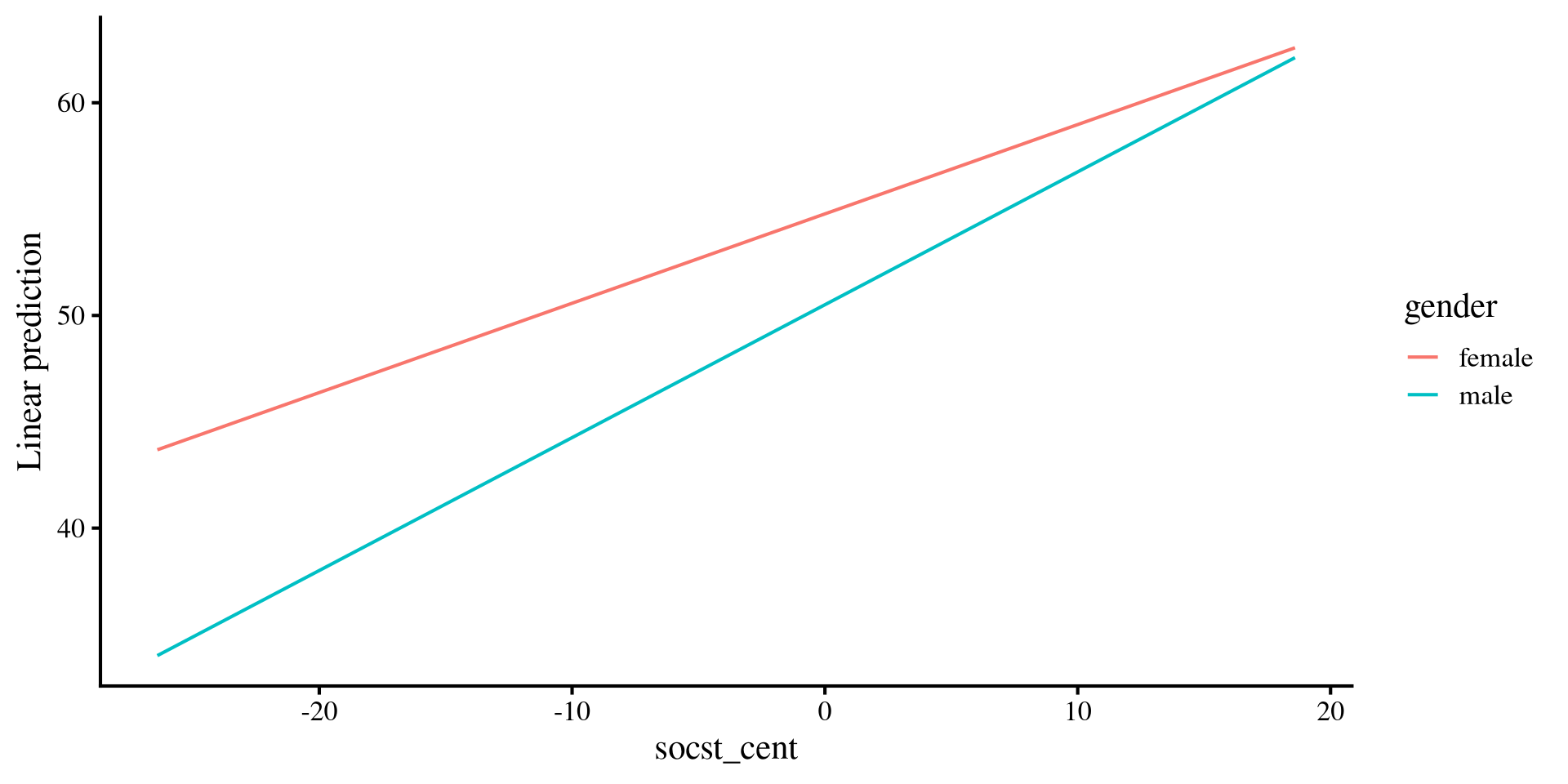
This may seem a bit complicated for no reason 🤨 but it affords lots of flexibility when your model is more complex than what we have here.
I personally prefer plotting things “manually” with ggplot 🫣, although I understand that may not be everyone’s cup of tea

Plotting with interact_plot()

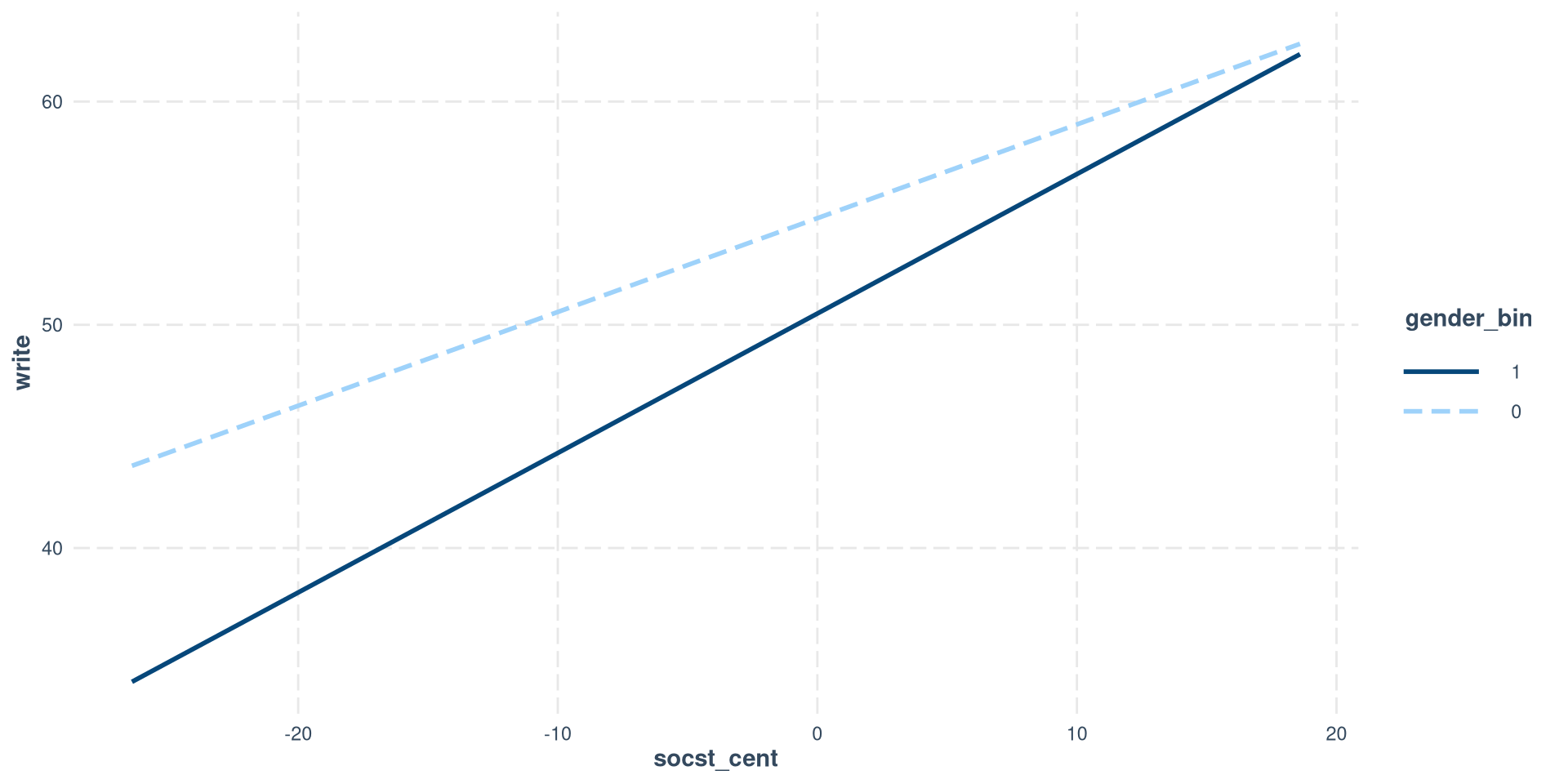
In our case, it is slightly simpler to use the interact_plot() function, but, unlike emmip(), it requires a binary variable and only works with 2 categories.

interactions::interact_plot(reg_int_2, 
              modx = "gender_bin",
              pred = "socst_cent",
              modx.values = c(0, 1))

Notice that I am using the regression model with the binary version of gender because the interactions package does not play nice factor variables.

So, you have multiple options for plotting simple slopes. Still, my go to is just using ggplot because it gives me the most freedom (as you can tell from earlier slides).
References

Lenth, R. V., Banfai, B., Bolker, B., Buerkner, P., Giné-Vázquez, I., Herve, M., Jung, M., Love, J., Miguez, F., Piaskowski, J., Riebl, H., & Singmann, H. (2025). Emmeans: Estimated Marginal Means, aka Least-Squares Means (Version 1.10.7) [Computer software]. https://cran.r-project.org/web/packages/emmeans/index.html